πŸ“± Step-by-step walkthrough

From vineyard pin
to GDD in minutes.

Contra Calor is designed to get out of your way. Here's exactly how to use it.

01
πŸ—ΊοΈ Map Tab

Pin your vineyard

Open the Map tab and tap anywhere on the map to drop a pin on your vineyard block. Search by city or address to pan the map first. Switch between Standard, Satellite, and Hybrid views to identify your exact location.

The app auto-detects your hemisphere from the latitude and confirms it with a blue banner below the map.
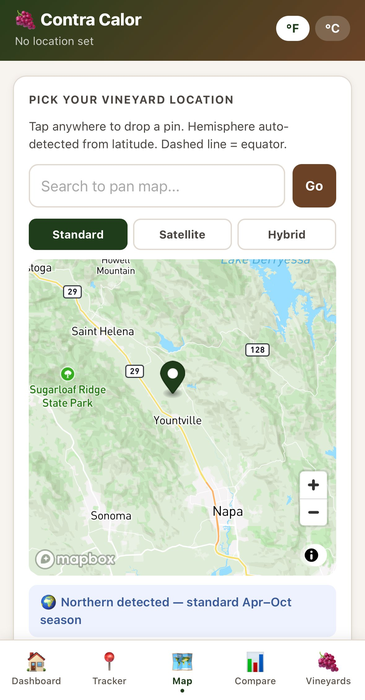
Pro tip: Use Satellite or Hybrid view to identify individual blocks within a larger property.
Map tab β€” drop a pin on your vineyard
02
πŸ“ Tracker Tab

Name your vineyard & set the vintage

After confirming your location, head to the Tracker tab. Enter your vineyard name β€” block name, estate name, whatever you call it. Then select your vintage year and adjust the date range if needed.

Dates default to April 1 – October 31 for Northern Hemisphere. The Vineyard Name field is required before calculating.
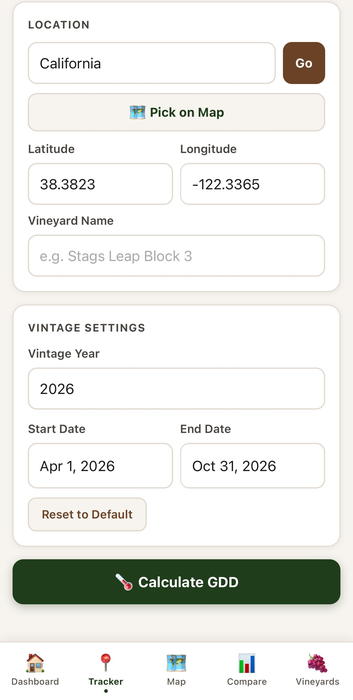
Required: A Vineyard Name must be entered before calculating β€” this becomes the label for your saved profile.
Tracker tab β€” name your vineyard and set vintage year
03
πŸ“ Tracker Tab

Calculate your GDD

Tap Calculate GDD. Within seconds you'll see your total GDD accumulation, Winkler region classification, and days tracked β€” pulled from station-priority weather observations closest to your vineyard.
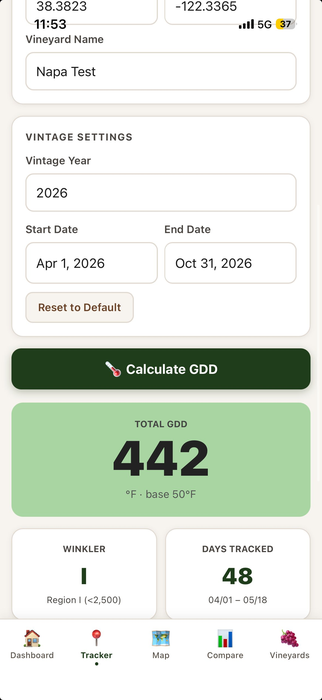
Winkler Regions: RI <2,500 Β· RII 2,501–3,000 Β· RIII 3,001–3,500 Β· RIV 3,501–4,000 Β· RV >4,000 GDDΒ°F
GDD results β€” total GDD, Winkler region, days tracked
04
πŸ“ Tracker Tab

View the accumulation curve & save

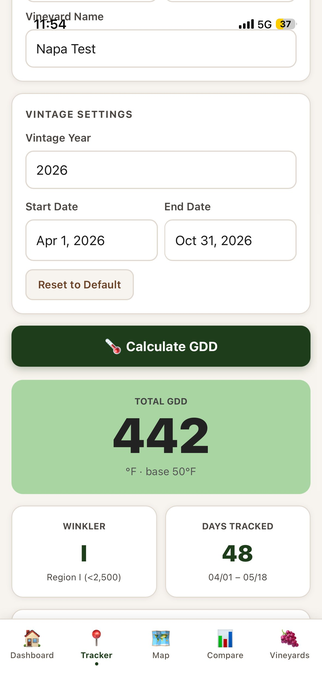
Scroll down to see the full Winkler Progress bar and accumulation curve chart showing your GDD build-up day by day. When you're ready, tap Save This Vintage to add it to your Vineyard profile.
Attribution: Weather data provided by Visual Crossing, validated to within 1.5–3.8% of CIMIS ground truth across California wine regions.
Accumulation curve and Save This Vintage button
05
πŸ‡ Vineyards Tab

Your vineyard profile, always up to date

Open the Vineyards tab to see your saved vineyard with its current GDD, Winkler region, days tracked, and accumulation chart. The current season updates automatically every day β€” just open the tab and it's always fresh.

Tap Load to instantly set the vineyard coordinates in the Tracker for calculating a new vintage or date range.
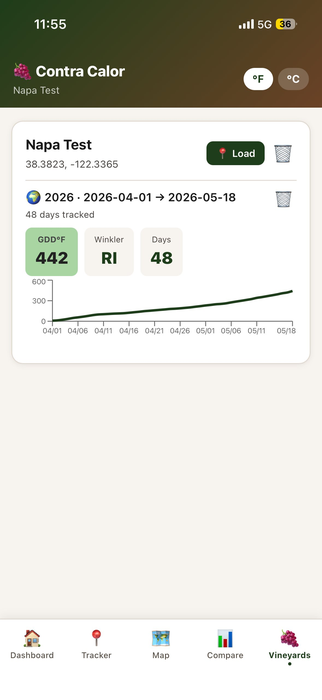
Pro users can save unlimited vineyards with full vintage history, and compare up to 3 vintages side by side in the Compare tab.
Vineyards tab β€” saved vineyard with live GDD tracking

Common questions.

What GDD formula does Contra Calor use?
The standard Winkler formula: base 50Β°F, daily average temperature ((max + min) Γ· 2) βˆ’ 50, April 1 – October 31, no upper threshold. Consistent with CIMIS, UC Davis, and Napa Valley Grapegrowers reporting. For Southern Hemisphere, Oct 1 – Apr 30.
Where does the weather data come from?
Contra Calor uses the Visual Crossing Weather API with station-priority mode β€” pulling from the closest real observation stations (NOAA, ASOS, Weather Underground PWS). Validated to within 1.5–3.8% of CIMIS and PWS ground truth. Read the full Data Accuracy Disclaimer β†’
How far back can I calculate historical vintages?
Historical data is available from 2000 onwards for most locations. Current season data is typically available within 1–3 days of today.
Does the current season update automatically?
Yes β€” when you open the Vineyards tab, Contra Calor fetches only the new days since your last update. Your current season GDD is always up to date without any manual action.
What's the difference between Free and Pro?
GDD calculation is always free for any location and any vintage. Free includes one saved vineyard with one active season. Pro ($4.99/mo or $39.99/yr) unlocks unlimited vineyards, full vintage history, 3-vintage comparison, and Southern Hemisphere support.
Does the app require location permissions?
No β€” Contra Calor never requests GPS access. All coordinates are entered manually via the map, by name search, or direct coordinate entry. See our Privacy Policy β†’

Ready to track your vintage?

Free to download. No account required.

🍎 Download on the App Store